
The End of Abyss scanner is on the d-pad and it gates progression: it reveals Energy Nodes that open locked doors, hidden paths, and the map itself.
End of Abyss Scanner Guide: Energy Nodes and Map Filling
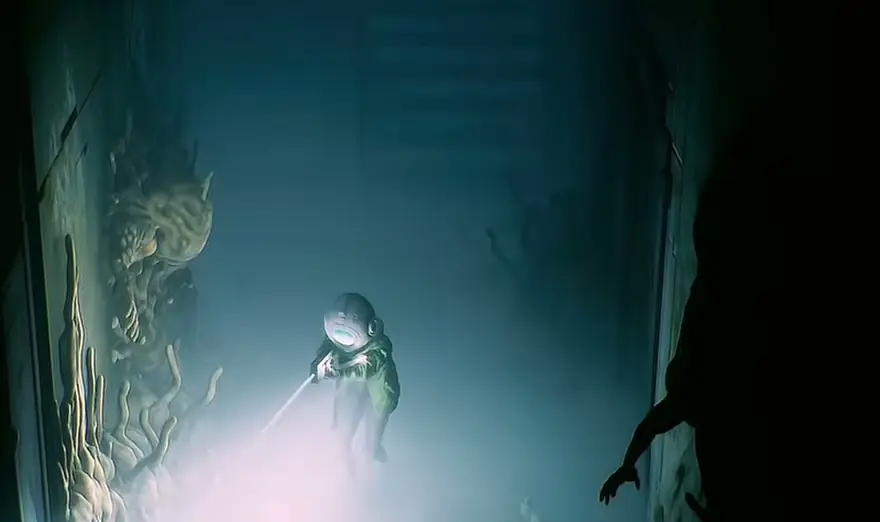
Press Down on the d-pad and Cel raises a scanner that floods the room with blue light. That one input does three jobs: it tells you which Energy Nodes feed a locked door so you can shoot them open, it flags the weak walls and blocked paths you can break or work around, and it drops a label on your map for everything it reads. Because the map only fills in as you scan, a room you never scanned is a room you do not have on paper.
How to turn the scanner on
Shacknews' reviewer described it plainly: "Hitting down on the d-pad opens a scanner that shines a bright blue light as it analyzes objects, structures, and creatures in the surrounding area." The same scan "register[s] new subjects to your log" and tells you "what a door might require, or what kind of enemy you're looking at."
No review or walkthrough describes a scan meter, cost or cooldown, so there is no reason to ration it. Those quotes come from controller play, and Section 9 has published no PC control scheme we could verify, so treat the d-pad as console wording until you read your own options screen.
Sweep the scanner across a room the moment you walk in, before you touch anything. It costs nothing and it is the only thing that puts that room on your map.
What the scanner reveals
| Target | What the scan tells you | What you do next |
|---|---|---|
| A locked door | Whether it wants a keycard or Energy Nodes | Shoot the nodes, or go find the key |
| A weak wall, vent or blocked path | That it is breakable and how | Explosive Charge, or a detour through the vents |
| Anything you walk past | A permanent label on that spot of map | Reference it later when you are lost |
| An enemy or creature | What it is, plus a Logbook entry | Log it, then decide how to fight it |
GamingTrend's review puts the priority in one sentence: the scanner "can be used to identify obstacles and how to get past them, doors and what keys are needed to unlock them, and enemies and how they are best defeated." The official store pitch frames the same idea, promising you can "uncover hidden areas using your Scanner and the tools you unlock along the way."
Official source: End of Abyss on the PlayStation Store (Section 9 Interactive / Epic Games, "Explore Lost Paths")
Energy Node doors: the locks you shoot open
An Energy Node Door is the one kind of lock that ignores your keycards. The nodes are wired to the door, the scanner shows you the run of the cables, and shooting every node drops the lock.
You learn the mechanic in the first ten minutes. Follow Soldier E-19 through the Outer Sector: he teaches levers and the Scanner, and the tutorial fires in the room with the broken panel. Drop through the hole in the floor, pull the lever that lets the soldier through, and the next door is your first Energy Node Door. Two nodes sit in the wall beside it. Shoot both and it opens. That is the opening of the story path walkthrough and the full walkthrough.
Four Energy Node Doors sit on the critical path, and the node count is not constant:
| Where | Nodes | Where they actually are |
|---|---|---|
| Outer Sector, first door after the soldier tutorial | 2 | In the wall beside the door |
| Factory West, after the Mechanical Crank bridge | 3 | In the walls around the door |
| Lower Levels B3, first Release Protocols door west of the Mainframe | 3 | One room back, on central servers; follow the wires |
| Lower Levels, second Energy Node Door past the Utility Tunnels Key | 3 | One room back again; follow the cables |
The Lower Levels pair is where people get stuck, because the nodes are not in the room with the door. Scan the wall, follow the highlighted cables back through the doorway, and the nodes are sitting on server racks in the room you just left. Both doors also trigger a lockdown encounter once the nodes die.
If a door stays locked after you have shot everything you can see, you missed a node — you did not fail the puzzle. Go back, scan the walls and the room behind you, and count what is left. If the door looks open on your map but will not physically open, that is a different problem, covered in the invisible wall and map bug guide.
Hidden paths and breakable obstacles
The scan is also how you find routes that are not routes yet. The Mechanical Crank is useless until you "extend the bridge," and the shortcuts that make later backtracking cheap all sit behind breakable geometry. Scan your dead ends and you find weak walls that take an Explosive Charge, crates that hide floor hatches, and covered vents leading somewhere better.
Some blocks are weapon-gated. On the way to the Neural Chamber boss, the Incinerator burns through a wall of growth that no amount of scanning gets through. Check what the scanner flags and what your weapons and ammo rules can break before you push into a new sector.
Not scanning means no map
This is the part that decides whether you get lost. GamingTrend, in a 90/100 review, wrote that "everything you scan is labeled on your map," then described losing time anyway: the facility is "incredibly dark in parts," sections are "densely layered, with multiple floors overlapping," and what links them is "ladders, anchor spots, elevators, destroyable walls, and extendable bridges."
One scan pays for itself immediately: the Map Station on the west side of the Control Room in the Communication Center. Scanning it fills in that sector's map data, which the walkthroughs call optional and most players will call the best two seconds of the run.
A routine that fixes most of it:
- Scan the room when you enter, before you clear it.
- Scan the door you came through, so the return trip is on the map.
- Scan again after a lockdown encounter, and scan every dead end, because dead ends are where the map is emptiest and the shortcuts are.
End of Abyss Map and Areas lists every sector and floor, so you can tell whether a gap means "I did not scan it" or "that floor genuinely does not exist."
Scanning creatures fills the Logbook
Shacknews' reviewer scanned everything, enemies actively chasing them included, and called it "a Pokedex for the horrors that lie underground." That is the collectible side: first-time scans register creature entries in the Logbook, whose four categories the official completion achievement names as Creatures, Notes, Data Shards and Codes.
Nothing in the reviews describes a scan as adding damage, so treat the enemy read as information, not a combat buff. Shoot with weapons; scan for the entry. Which Logbook entries need a scan and which just need you to walk over them is in the Logbook collectibles guide.
Second Sight: the scanner upgrade
The Epic achievement list includes Second Sight — Upgrade the Scanner, worth 5 XP, with 0.2% of players unlocking it as of the 2026-10-03 store listing. That confirms the scanner is upgradeable, and that almost nobody has gotten there yet. What we cannot tell you is what the upgrade changes: the achievement is one line with no description, no patch note and no review coverage attached, so anyone claiming longer scan range or a wider reveal at level two is guessing. The rarity ranking for the rest of the set is in the trophies and achievements guide.
Where the scanner stops helping
Three things look like scanner problems and are not:
- Keycard doors. A scan tells you a door needs a key it will never give you. Use the symptom list in End of Abyss Stuck.
- Elemental hazards. Radiation in the Containment Sector ticks your health down no matter what you scanned. That is a Suit Mod problem.
- Bugs. Invisible walls and maps marking opened doors as locked are reported by multiple reviewers, and a scan cannot render a wall the game never placed. Reset at a Restoration Pod instead.
FAQ
Where do I learn the scanner in End of Abyss? In the Outer Sector, following Soldier E-19. The tutorial fires in the room with the broken panel, minutes before your first Energy Node Door.
Can I open an Energy Node Door without scanning? You can, but you are guessing. The nodes are in the wall beside the door or a room back behind it.
Is there a scanner button on PC? The PC version is Epic Games Store only. The d-pad binding is documented for controllers; we found no official PC keybind listing.
What does the Second Sight upgrade give me? The effect is undocumented anywhere we could reach, so treat it as a late-game goal, not a planning input.
Related
More End of Abyss Guides
End of Abyss spawns random invisible walls and a map that marks open doors as locked. What each bug looks like and how to get past it.
Every End of Abyss area and floor in one table: Outer Sector, Habitation, Factory East and West, Waterworks, Containment Sector, Lower Levels.
End of Abyss PC is Epic Games Store only. How to install and run it, which settings actually exist, and the answer on co-op and Steam.
End of Abyss scored 8, 90 and 6 across Shacknews, GamingTrend, GameSpot and IGN. What they all agree on, where they split, and who should skip it.
The exact End of Abyss progression chain: three power cores, three SCU overrides, the Central Elevator to Lower Levels, and every keycard on the way.
End of Abyss never explains itself. Who Cel is, why she was sent underground, and what the parasite, the crew and the notes actually tell you.
Missing a lever you already walked past? End of Abyss buries progression in dark multi-floor rooms. A symptom-to-fix table for the common softlocks.
How End of Abyss Suit Power works, where Energy Cells raise it, and which Suit Mod you need to survive radiation. The gate is your suit, not your damage.